
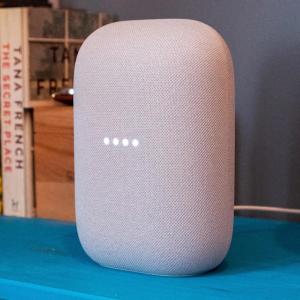
A decade ago, smart speakers like Alexa and Siri were just hitting the market. People envisioned them evolving into super-smart companions, much like beloved sci-fi characters. But the journey has taken longer than many thought. For years, these virtual assistants seemed stagnant.
Now, things are changing. With the arrival of generative AI, smart speakers are finally starting to meet those high expectations. Google’s latest offering, Gemini for Home, is now available for early access.
What to Expect from Gemini for Home
Gemini for Home is still in early access. This means Google is gathering user feedback, and like any new technology, it may have its hiccups. If something goes wrong, you can easily send feedback through the Google Home app or by simply saying, “Hey Google, send feedback.”
Compatible Devices
Before diving in, make sure your speaker is compatible. Gemini works best on the newer models like:
- Google Nest Hub (2nd gen)
- Google Nest Audio
- Google Nest Mini (2nd gen)
- Google Nest Hub Max
If you have older models like the Google Home Max or Nest Hub (1st gen), you might miss out on some features, such as Gemini Live. Importantly, once you switch to Gemini, you can’t go back to the standard Google Assistant. Keep that in mind before making the upgrade.
Getting Early Access
To sign up for early access, open the Google Home app on your smartphone. Tap your profile picture, go to Home Settings, and select Early Access. You might have to wait for confirmation, but once you’re in, you’ll see a notification welcoming you to Gemini.
Once everything is set up, all your compatible speakers will be upgraded to this smarter assistant. You’ll be able to ask much more complex questions, similar to chatbots like ChatGPT, but in your living room.
Subscription Costs
To enjoy Gemini Live, you’ll need a Google Home Premium subscription. The standard version costs $10 a month or $100 a year. If you’re not looking for extra features, the basic plan is the way to go. Both tiers offer access to Gemini Live.
What You Can Do with Gemini
Gemini for Home allows you to ask various questions. You can request facts, such as sports statistics, or even have it explain complex topics in simple terms. For example, you could ask, “What are the top five basketball scorers?” or request cooking tips based on dietary needs. While it may not be as advanced as C-3PO just yet, it’s definitely progressing.
User Reactions
Initial reactions on platforms like Twitter show excitement about the new features. Users are sharing their experiences and tips for getting the most out of Gemini. Many are impressed with the assistant’s ability to hold natural conversations compared to previous versions.
Conclusion
As smart speakers continue to evolve with AI technology, tools like Gemini for Home are paving the way for a more interactive and helpful home assistant. With user feedback shaping its development, it’s an exciting time for tech enthusiasts and everyday users alike.
For more detailed insights, check out Google’s own resources here.
Source link
Google, Google Home, Google Nest Hub
