
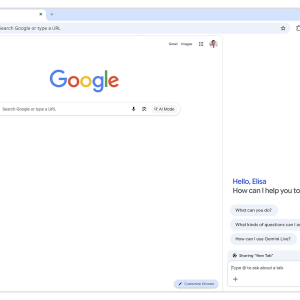
Google has recently revamped Chrome with some exciting AI features powered by its Gemini technology. Right off the bat, users will notice a new sidebar that makes multitasking much easier. You can chat with Gemini while juggling multiple tabs. This feature is great for people who compare options across sites or sort through busy calendars.
One standout tool is called Nano Banana, which lets you create and edit images right from the sidebar. No more hopping between tabs! A quick command gets you the visuals you need instantly.
Looking ahead, Google plans to enhance the browsing experience further with a feature that remembers your previous conversations with Gemini. This means the browser could offer tailored suggestions, making it feel more like a personal assistant.
In addition to that, Chrome now integrates with Google’s other services, like Gmail and Calendar. For instance, Gemini can pull up your kids’ spring break dates based solely on your emails—without you having to specify where to look.
Another neat feature in the pipeline is called “auto browse.” This function allows Gemini to tackle tasks for you. During a demo, a Google employee asked Gemini to find a specific winter jacket from their past purchases. While the AI worked on the search, the employee continued browsing without interruption. Though it might be a bit slower than doing it yourself, this feature could be a time-saver for those who often order the same items online.
The introduction of these tools is backed by a growing trend: more people are seeking digital assistants to streamline their daily tasks. According to a recent survey, nearly 60% of users expressed excitement about AI’s role in simplifying online activities.
As companies continue to innovate, Google’s integration of AI into everyday tasks sets a promising direction for how we interact with technology. You can learn more about these updates in detail on Google’s blog.
Source link
Google, image generator, Google AI
